
Witika CV Builder
Software Overview
Witika CV Builder is an advanced professional CV and résumé creation software designed to help individuals, academic professionals, students, researchers, consultants, executives, healthcare workers, engineers, lawyers, economists, business professionals, and job seekers create high-quality CVs with ease.
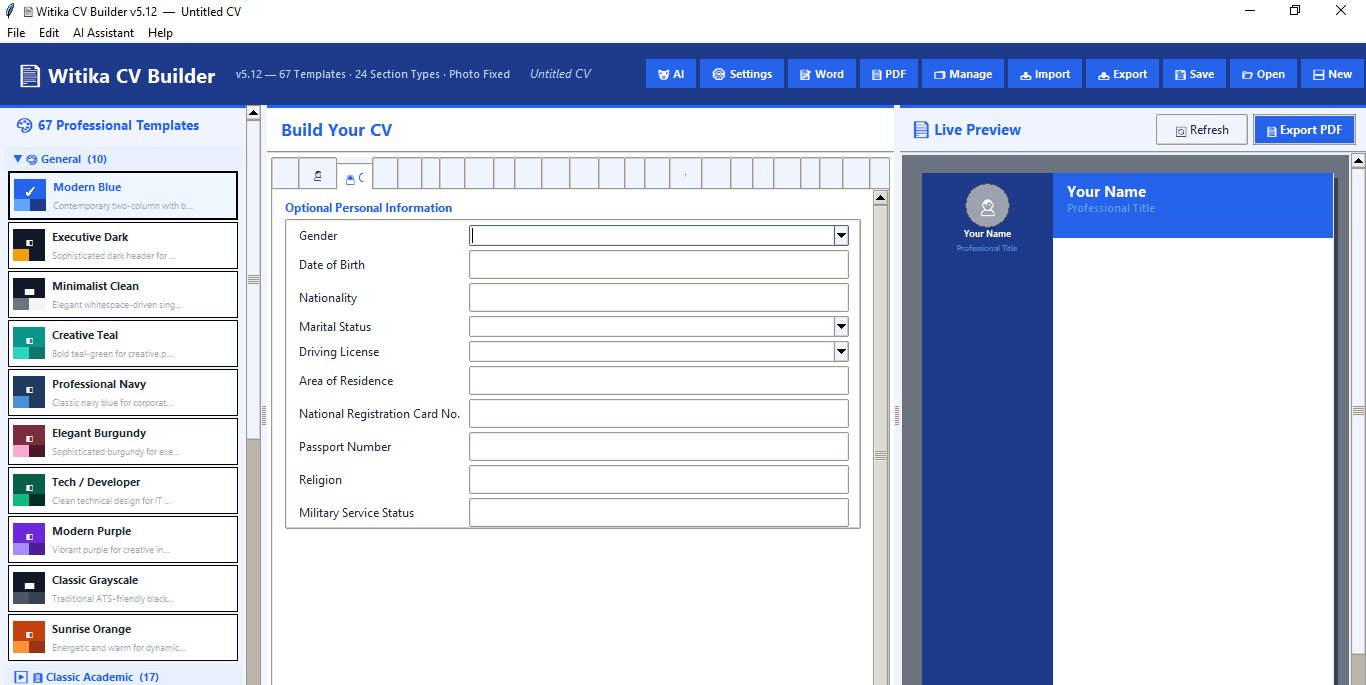
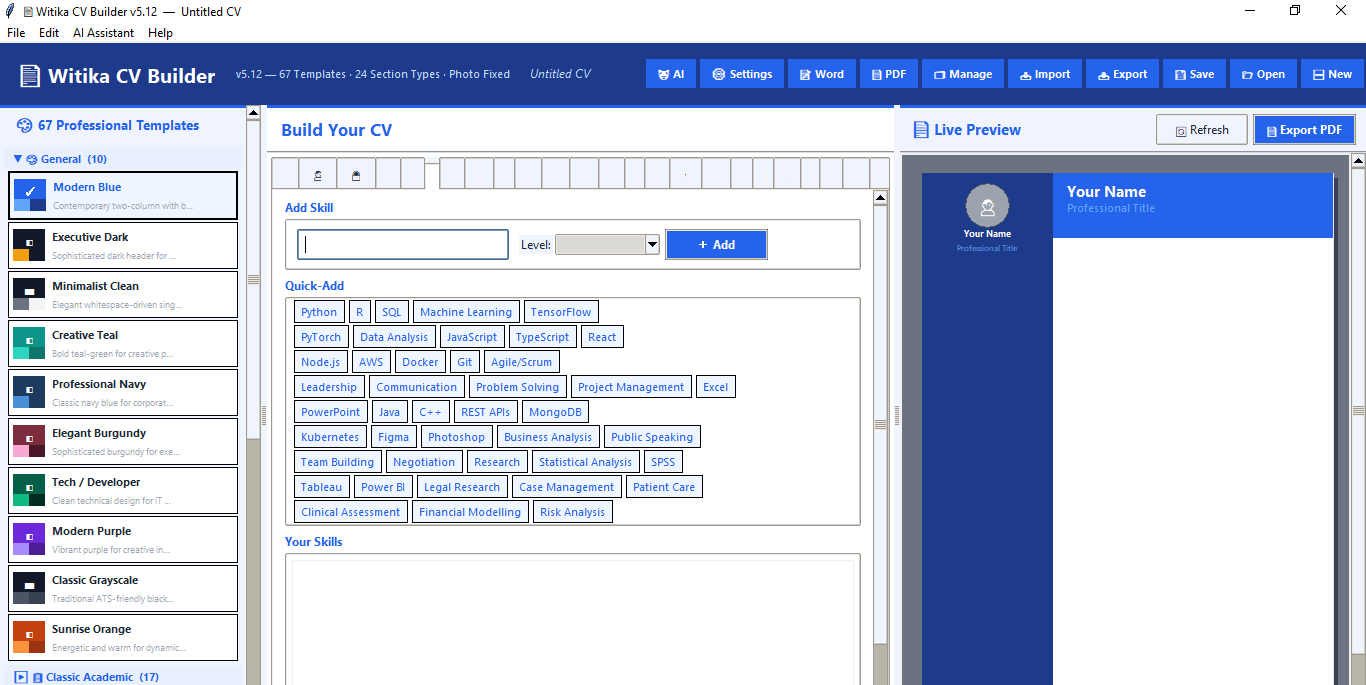
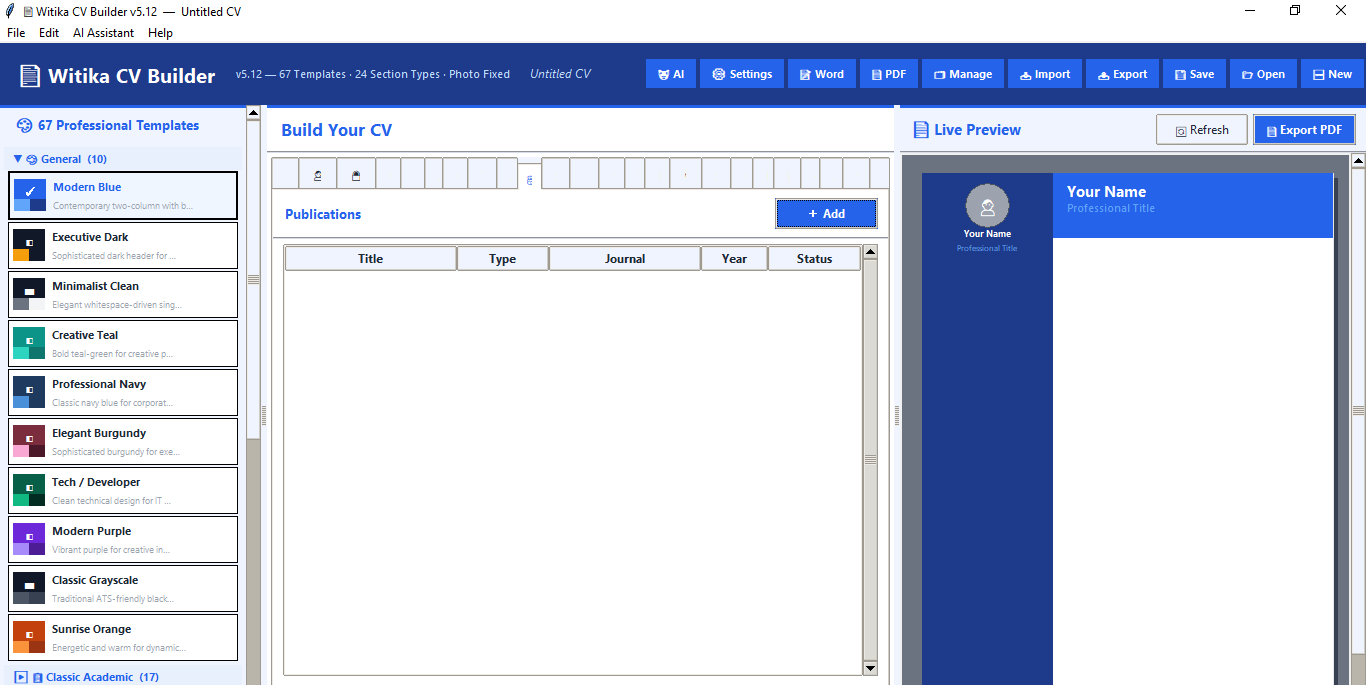
The software provides a structured CV-building environment where users can enter personal information, work experience, education, skills, languages, publications, conferences, awards, references, volunteer work, memberships, training, coursework, grants, teaching experience, invited talks, editorial activities, and academic profile links. It also includes AI-assisted CV development, professional templates, photo support, live preview, PDF export, Word export, and project saving.
Witika CV Builder is useful for anyone who wants to create a polished, professional, academic, corporate, technical, or industry-specific CV without struggling with formatting, layout design, or manual document editing.

Value to Academia
Witika CV Builder is highly valuable for academic users because it supports many sections that are essential in academic and research-based CVs. These include publications, conference attendance, presentations, innovations, awards, grants, teaching experience, invited talks, editorial activities, memberships, coursework, training, references, and academic profile links such as ORCID, Google Scholar, ResearchGate, researcher ID, and Scopus ID.
For lecturers, researchers, postgraduate students, PhD candidates, professors, and academic administrators, the software makes it easier to prepare CVs for scholarship applications, university employment, academic promotion, grant applications, consultancy opportunities, research collaborations, conference submissions, and fellowship applications.
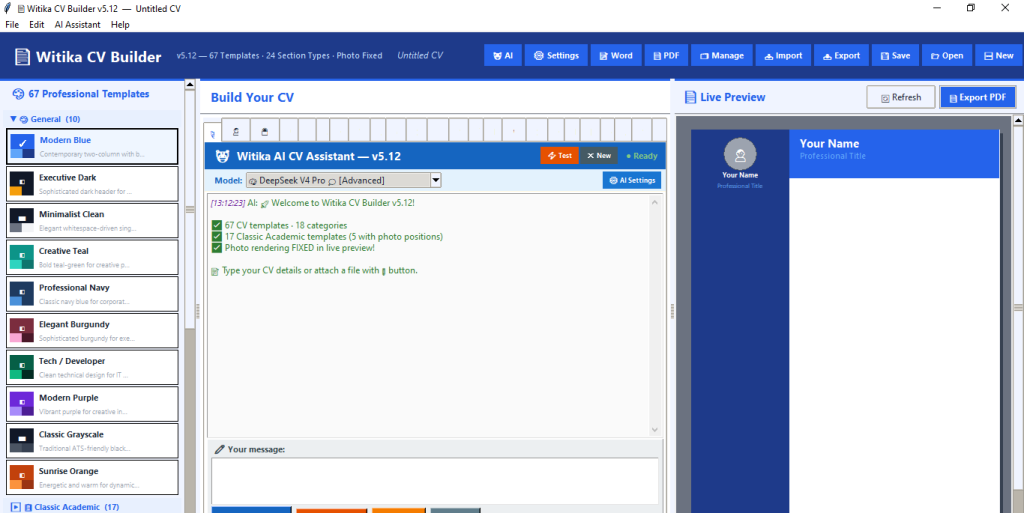
The software includes 17 classic academic templates, including formal black-and-white academic designs and templates with photo positions. These are suitable for traditional academic CVs, research CVs, university applications, thesis-related documentation, and professional academic profiles.
Its structured fields help academics present their career history in a clear and standardized way. Instead of spending hours arranging headings, spacing, tables, and sections manually, users can focus on the content of their academic achievements while the software manages presentation and formatting.
Value to the Corporate World
For professionals in the corporate sector, Witika CV Builder provides a fast and reliable way to create modern, attractive, and professional CVs for employment, promotion, consultancy, board appointments, executive recruitment, and career transition.
The software includes templates for business, consulting, technology, cybersecurity, marketing, finance, engineering, legal, healthcare, architecture, creative industries, human resources, and executive leadership. This allows users to choose a design that matches their industry and professional identity.
Corporate users can use the software to create CVs that highlight work experience, leadership roles, achievements, technical skills, certifications, projects, professional memberships, awards, and references. The live preview helps users immediately see how their CV will look before exporting it.
The software also supports PDF and Word export, which is important for job applications, corporate recruitment platforms, HR departments, and professional submissions. Users can save different CV projects and update them over time for different job opportunities or professional purposes.
Value to the Policy Sphere
Witika CV Builder is also useful for policymakers, government officers, development professionals, NGO staff, researchers in public policy, consultants, and international development experts. Many policy-related professionals need detailed CVs that capture not only employment history but also publications, grants, conferences, presentations, training, memberships, teaching, research outputs, and invited talks.
The software helps policy professionals prepare strong CVs for consultancy bids, donor-funded projects, government appointments, public sector recruitment, research assignments, think tank roles, and international development opportunities.
For policy experts, the ability to document professional training, funding experience, publications, presentations, and institutional memberships is important. Witika CV Builder provides structured sections for these details, making it easier to produce a complete and credible professional profile.

Professional Templates and Design Options
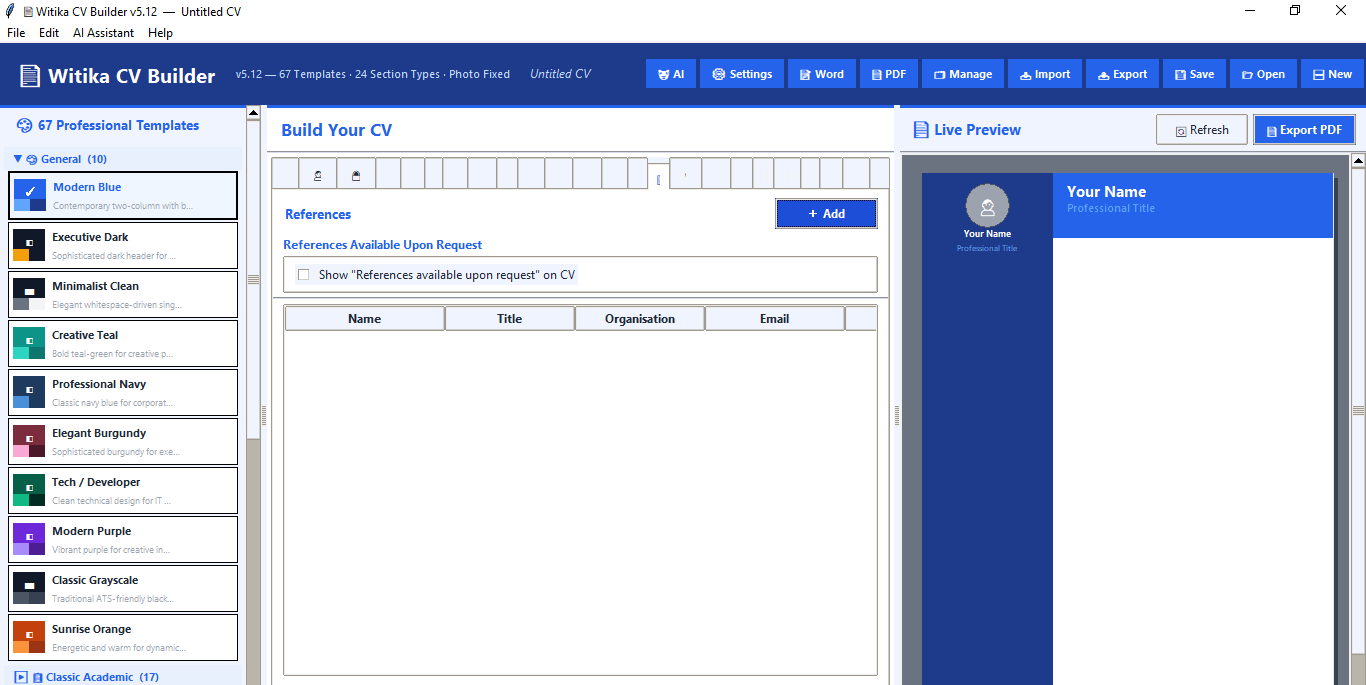
Witika CV Builder includes 67 professional CV templates across 18 categories. These include general professional templates, classic academic templates, right-sidebar templates, timeline templates, banner templates, infographic templates, data science and AI templates, legal templates, economics and finance templates, medical and nursing templates, engineering templates, science and research templates, business templates, creative and media templates, HR and psychology templates, technology templates, academia templates, and architecture templates.
The software includes modern and traditional designs, allowing users to choose between creative layouts, executive styles, academic black-and-white formats, corporate designs, technical layouts, and industry-specific templates.
It also includes 18 font families, including Helvetica, Times Roman, Courier, Palatino, Garamond, Computer Modern, Latin Modern, STIX Two, Cambria, Georgia, Book Antiqua, Baskerville, Arial, Calibri, Verdana, Trebuchet, Futura, and Optima. This gives users flexibility in creating a CV that matches their profession, style, and target audience.
AI-Powered CV Assistance
Witika CV Builder includes an AI assistant that can help users build their CV from plain text, uploaded files, or conversational instructions. Users can describe their background, qualifications, experience, publications, skills, and achievements, and the AI assistant can convert that information into structured CV sections.
The AI assistant is designed to physically populate the CV fields using action-based commands. This means the user can provide career information in natural language, and the software can add it to the correct CV sections automatically.
The AI system supports multiple platforms, including OpenRouter, DeepSeek, OpenAI, Anthropic, Google Gemini, Groq, Mistral AI, Ollama Local, and Custom API endpoints. It also supports custom models, streaming responses, and reasoning tokens for compatible models.
This feature is particularly valuable for users who struggle to organize their CV content, write professional descriptions, summarize achievements, or decide where certain information should appear.
File Reading and CV Extraction
Witika CV Builder can read and process attached files such as PDF, Word documents, text files, and markdown files where supported by the installed dependencies. This allows users to attach an old CV, career profile, publication list, or professional biography and ask the AI assistant to help convert the content into a structured new CV.
This is useful for clients who already have scattered career information in different documents and want to transform it into a cleaner, updated, professional CV.
Photo and Live Preview Features
The software includes photo upload functionality and a live preview panel. Users can add a professional headshot, and the software can display it in supported templates.
The photo rendering system supports smart center cropping, circular photo display, cached photo objects to prevent display errors, and automatic refresh when a photo is uploaded, removed, or adjusted. Photo positions are supported across several layouts, including classic academic photo templates, sidebar templates, banner templates, timeline templates, infographic templates, and single-column layouts.
The live preview feature allows users to see their CV design as they build it. This helps users make informed decisions about templates, layout, photos, fonts, spacing, and section content before exporting the final document.
Export and Project Management
Witika CV Builder allows users to export their CV as a professional PDF document. It also supports Word document export where the required Word library is installed. This gives clients flexibility because some institutions require PDF submissions while others require editable Word files.
The software also includes project saving and project management. Users can save multiple CV projects, open recent projects, export CV project files, import CV project files, and manage saved CV versions. This is useful for users who need different CVs for different purposes, such as academic applications, consultancy proposals, corporate jobs, scholarship applications, and professional profiles.




Key Features
Witika CV Builder includes:
- Professional CV and résumé creation.
- 67 professional templates across 18 categories.
- 17 classic academic templates, including photo-based academic layouts.
- 18 font families for academic, corporate, technical, and creative styles.
- Live CV preview.
- Photo upload and smart photo rendering.
- PDF export.
- Word export where supported.
- Project saving, importing, and exporting.
- AI-assisted CV creation.
- File attachment support for PDF, Word, text, and markdown documents.
- Support for detailed academic CV sections.
- Support for corporate, technical, business, legal, medical, engineering, finance, and policy-related CVs.
- References and references-on-request options.
- Skill levels from beginner to expert.
- Career objective and professional summary sections.
- Training, coursework, grants, teaching, invited talks, and editorial activity sections.
- Academic profile fields such as ORCID, Google Scholar, ResearchGate, researcher ID, and Scopus ID.
Who Should Use Witika CV Builder
Witika CV Builder is suitable for:
- Students applying for internships, scholarships, and graduate programmes.
- Job seekers applying for employment opportunities.
- Lecturers, researchers, and postgraduate students preparing academic CVs.
- Professionals applying for promotions or executive roles.
- Consultants preparing CVs for proposals and donor-funded projects.
- Government and policy professionals applying for appointments, tenders, and consultancies.
- Healthcare workers preparing nursing, physician, and public health CVs.
- Engineers, architects, data scientists, developers, economists, lawyers, finance professionals, and business executives.
- NGO and development sector professionals preparing institutional or project-related CVs.

Why Clients Should Choose This Software
Witika CV Builder saves time, improves presentation quality, and helps users produce professional CVs without needing advanced design or formatting skills. It combines CV structure, professional templates, live preview, export tools, photo support, AI assistance, and project management in one software package.
The software is especially useful because it supports both short professional résumés and long academic CVs. This makes it suitable for a wide range of users, from students and entry-level job seekers to senior academics, executives, consultants, and policy experts.
By using Witika CV Builder, clients can create CVs that are visually professional, well organized, detailed, and tailored to specific career goals.
Trial and Subscription Information
Trying Witika CV Builder is free of charge. Clients can run and test the software for free until the expiry of the trial version. After the trial period expires, clients can decide whether to subscribe and continue using the software.
The subscription fee is K300 per month for Zambian clients and USD 50 per month for clients from foreign countries.
The payment method is open to discussion with each client because different clients may prefer different payment options. Clients are also free to cancel their subscription at any time.
Please subscribe to continue using this software after the trial version expires.
Subscription Assistance
For subscription assistance, please contact Research Expert Solutions by email at:
resgroup@research-expert-solutions.com
Alternatively, for a prompt response, you can call or send a WhatsApp message to:
+260 972 412 315
We look forward to assisting you.